
In myDLMS, a "role" defines your access to information, documents and permissions within the DLMS User Association. It determines your rights to perform specific tasks, such as viewing and modifying your profile, accessing documents or managing data.
Your current role is displayed in the top right corner of the myDLMS header once you are logged in.
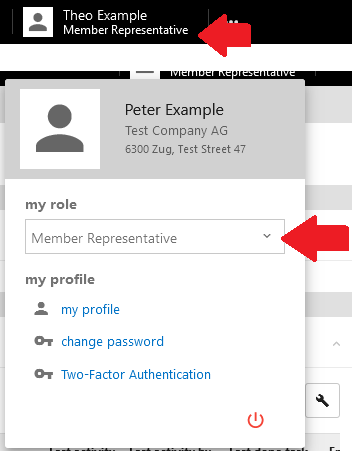
You may hold multiple roles. Switching between roles applies the relevant rights immediately without requiring a page refresh or logout. You can see all your assigned roles and associated rights groups in the "Contact Profile" section under your login data.
Editing and Managing Roles:
- Role Management: Representatives can manage contact information. Editable fields are marked with a blue pencil icon. Any changes you make must be approved by DLMS staff before they are finalized.
- Rights Groups: Roles are tied to specific rights groups. For instance, users in a particular working group are automatically assigned the "Working Group" role. Rights to documents and processes are managed based on these groups.
How Roles Are Assigned:
Roles and rights groups are assigned based on your membership functions (e.g., Representative, Member Contact, Financial Representative) or by administrators. For Working Groups, Taskforces, or Board roles, the respective secretaries manage role assignments.
- Users cannot assign or modify their own roles or rights groups.
- You can only switch between your assigned roles to access documents and information based on the permissions tied to each role.